Conversion
How to Convert Mesh to Point Cloud: Sampling Methods and Density
How to convert mesh to point cloud starts with sampling points across a polygon mesh rather than copying only its vertices. The output holds independent XYZ positions, not connected faces. CloudCompare can sample by surface density or target count, while Open3D offers area-weighted random and Poisson disk sampling. Neither process improves errors already present in the source geometry.
For a building mesh, scale and triangle quality matter as much as the chosen point count. A roof with large triangles may look sparse if you export vertices alone, even when the original surface is complete. The workflow below covers mesh preparation, density calculations, practical conversion steps, and checks for gaps and lost attributes.
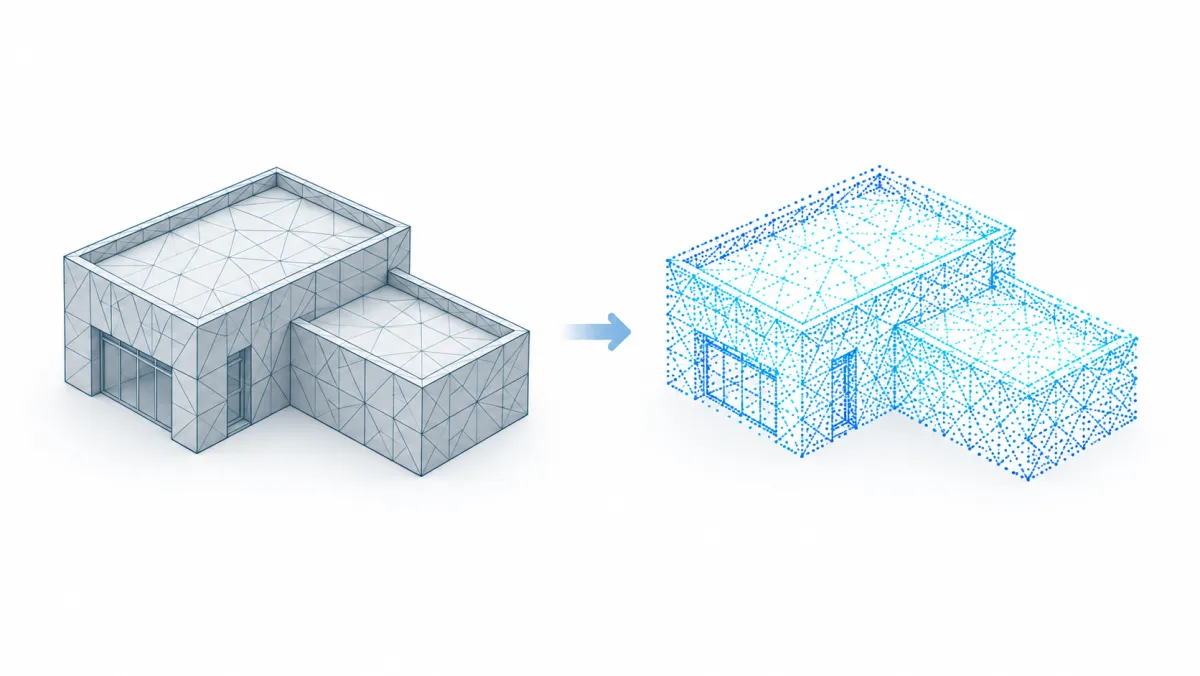
What happens when a mesh becomes a point cloud?
A polygon mesh stores vertices connected by edges and faces. A point cloud stores positions, sometimes accompanied by colors or normals, but no face connectivity. Sampling represents the source surface without preserving topology or creating any new physical survey measurements. If your source is photos instead of a mesh, see how to convert image to point cloud data.
| Property | Polygon mesh | Sampled point cloud |
|---|---|---|
| Geometry | Connected vertices and faces | Independent XYZ positions |
| Surface representation | Explicit triangles or polygons | Discrete surface samples |
| Connectivity | Stored | Not stored |
| Sampling control | Depends on topology | Point count or surface density |
| Common exchange files | OBJ, STL, PLY | XYZ, PLY, PCD |
Differences between mesh and point cloud geometry, including faces, connectivity, density control, and exchange formats.
Why is vertex extraction different from surface sampling?
Exporting mesh vertices copies existing coordinates without adding points inside faces. Large triangles may therefore look empty while tightly subdivided regions appear dense. Surface sampling instead draws positions across each triangle according to area. It gives a more useful representation when the aim is balanced coverage of the visible geometry.
What information is lost during conversion?
A typical XYZ cloud loses face connectivity, material assignments, texture coordinates, and other mesh properties unless they are exported separately or mapped into supported point attributes. PLY can carry colors and normals when the software writes them. Neither output automatically retains the editable object structure of the original model.
How should you prepare a 3D mesh for sampling?
Check mesh units, coordinates, selected surfaces, and triangle integrity before sampling. A millimeter-based model has an area one million times larger numerically than its meter-based equivalent. Duplicate faces may also be sampled twice, while invalid triangles can produce unusable output.
Confirm units, scale, and the intended surface area
First inspect a known dimension, such as a doorway width or floor span. Convert units before selecting a density stated in points per square meter. Decide whether interior faces, hidden layers, and enclosed cavities belong in the sample. A facade-only deliverable should not accidentally include every unseen internal face.
Clean duplicate and degenerate triangle faces
Remove overlapping faces, zero-area triangles, and irrelevant disconnected fragments. Repair normals if the intended export uses them, but do not close legitimate doors or openings merely to make the mesh watertight. Record any geometry changes because they alter the area used to calculate sampling density.
Which mesh sampling method should you choose?
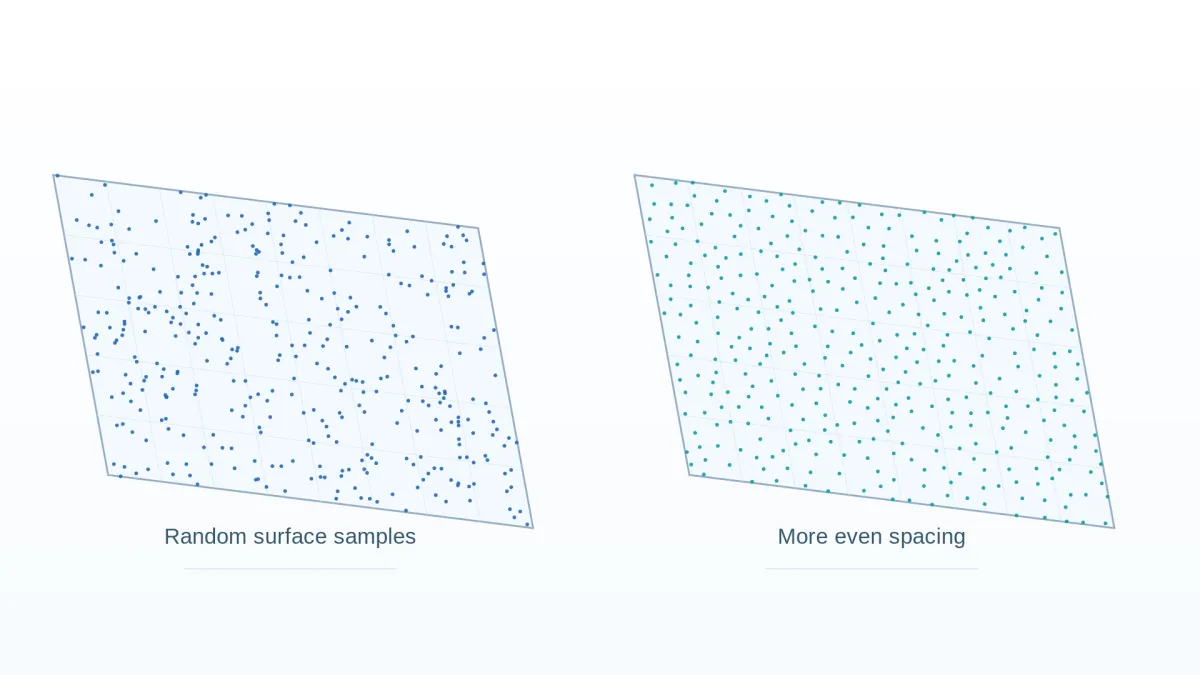
Area-weighted uniform random sampling is straightforward when you need a target number of surface points. Poisson disk sampling aims for more even local spacing by reducing clustering. Neither records new building measurements. Choose based on coverage requirements, computation time, and downstream software.
Uniform random sampling for target point counts
Uniform surface sampling selects triangles in proportion to their area, then draws points inside them. Larger faces receive more samples on average regardless of the mesh's vertex count. It is efficient and suitable for quick conversion, although independent random positions may cluster or leave small local gaps.
Poisson disk sampling for more even spacing
Poisson disk approaches reduce very close neighbors and usually produce a more balanced spatial distribution. Open3D implements sample elimination from a larger initial set. The result still needs inspection near edges, small openings, and narrow features. A nominal point spacing is not a guarantee that every neighboring pair has that distance.
How do you calculate point density and nominal spacing?
Sampling density is the number of generated points divided by the selected mesh surface area. Use D = N/A, or N = D × A, where D is points per square meter, N is the target point count, and A is area in square meters. Verify area after cleaning and unit conversion.
For a 120 m² mesh, S ≈ √(1/D) estimates nominal spacing, not actual nearest-neighbor distance.
| Target density | Target count on 120 m² | Nominal spacing |
|---|---|---|
| 100 points/m² | 12,000 | 100 mm |
| 400 points/m² | 48,000 | 50 mm |
| 1,600 points/m² | 192,000 | 25 mm |
Example mesh sampling density calculations for a 120-square-meter surface, showing target points and approximate spacing.
These are planning examples, not tolerances. Use a point cloud density calculator for other surface areas.
How to convert mesh to point cloud with CloudCompare and Open3D
CloudCompare offers a visual workflow for mesh sampling, while Open3D supports repeatable scripted conversion. Both need a polygon surface, not loose vertices. Choose a target count from the surface area, generate points, and export a compatible cloud format. Check exported attributes.
Convert 3D model to point cloud in CloudCompare
Open the OBJ, STL, or PLY mesh and select its mesh entity. Choose Edit > Mesh > Sample points, then enter an approximate point count or a surface density in the mesh's squared coordinate units. Export the generated cloud in a supported format. Inspect optional colors and normals before saving. To choose the export type, compare each point cloud data format in the formats guide.
Convert OBJ to point cloud with Open3D
Open3D reads triangle meshes and samples their surfaces using sample_points_uniformly or sample_points_poisson_disk. For a cleaned OBJ, read the mesh, choose 48,000 points for the example above, and write the result as PLY. The functions operate on faces; they do not infer missing building surfaces.
import open3d as o3d
mesh = o3d.io.read_triangle_mesh("building.obj")
if len(mesh.triangles) == 0:
    raise ValueError("The input needs triangle faces")
cloud = mesh.sample_points_poisson_disk(number_of_points=48000)
o3d.io.write_point_cloud("building_points.ply", cloud)
How do you validate the converted point cloud?
Check more than total points. Confirm the output bounds, units, colors, normals, and surface coverage around edges and openings. Points sampled directly from valid triangles should lie on the source mesh to numerical precision, but that alone cannot prove that every surface area was sampled adequately.
Inspect local coverage instead of just global density
Measure nearest-neighbor distances and inspect sparse patches, corners, and narrow components. Compare representative positions on the source mesh with nearby sampled points to assess coverage. A point-to-mesh distance close to zero is expected for on-surface samples and is a weak test of missing areas by itself.
Check attributes and reimport the exported file
Reopen the output in its receiving application. XYZ may contain only coordinates, while PLY or PCD can preserve additional fields when supported. Verify units, orientation, and any color or normal data that the downstream task requires. Archive the source mesh and sampling parameters for repeatable exports.
What errors commonly affect mesh-to-cloud conversion?
Most failures come from wrong scale, sampling vertices instead of faces, unnecessary overlapping triangles, or incompatible export attributes. A dense cloud may look convincing while losing small features or carrying the wrong units. Resolve the source geometry and output requirements before increasing point count or rerunning conversion.
| Symptom | Likely cause | First correction |
|---|---|---|
| Large faces look empty | Vertices exported without sampling | Sample triangle interiors |
| Points cluster heavily | Independent random distribution | Try spacing-aware sampling |
| Output is oversized | Density too high for task | Lower target count or crop scope |
| Dimensions look wrong | Unit conversion error | Check known length and area |
| Colors disappear | Output format or mapping | Check color support and export options |
Troubleshooting table for uneven mesh sampling, oversized point clouds, incorrect dimensions, and missing point attributes.
Can a sampled point cloud replace the source mesh?
No. A sampled point cloud cannot fully replace its source mesh because it does not preserve polygon connectivity, original faces, or all material and texture information. It is not a lossless replacement for the mesh. Surface reconstruction may generate new faces, but the original topology, textures, and detailed object structure are not guaranteed to return.
Frequently asked questions about converting mesh geometry
Most supported polygon meshes can be sampled into independent points, but the result depends on the source geometry and chosen output format. Dense sampling makes a surface look continuous without correcting geometric errors in the original. Preserve the mesh, record the sampling method, and test the cloud before using it downstream.
Does increasing density make a point cloud more accurate?
Not in the sense of improving the source model. More points reduce gaps between samples and may represent small existing features better, but they cannot repair an incorrectly modeled wall or invented surface. Evaluate both the sampling coverage and the geometric accuracy of the mesh from which the points were drawn.
Can the resulting point cloud become a mesh again?
Yes, surface reconstruction can build new triangles from sampled points, often using estimated normals and neighborhood information. However, reconstruction does not guarantee the original faces, openings, materials, or exact vertex connectivity. If preserving editable geometry matters, keep the original mesh instead of treating the generated cloud as its archive.
Keep reading